Classes |
Public Types |
Public Member Functions |
Public Attributes |
Protected Member Functions |
Protected Attributes |
List of all members
vctPlot2DBase Class Referenceabstract
#include <vctPlot2DBase.h>
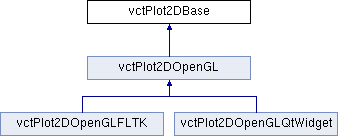
Inheritance diagram for vctPlot2DBase:
Classes | |
| class | Signal |
| class | VerticalLine |
| class | Scale |
Public Types | |
| typedef std::map< std::string, Scale * > | ScalesType |
Public Member Functions | |
| vctPlot2DBase::Scale * | AddScale (const std::string &name) |
| vctPlot2DBase::Scale * | FindScale (const std::string &name) |
| bool | RemoveScale (const std::string &name) |
| bool | RemoveScale (const vctPlot2DBase::Scale *scale) |
| ScalesType & | GetScales (void) |
| vctPlot2DBase (size_t PointSize=2) | |
| virtual | ~vctPlot2DBase () |
| void | SetNumberOfPoints (size_t numberOfPoints) |
| Signal CISST_DEPRECATED * | AddSignal (const std::string &name) |
| VerticalLine CISST_DEPRECATED * | AddVerticalLine (const std::string &name) |
| void | AutoFitX (double padding=0.0) |
| void | FitX (double min, double max, double padding=0.0) |
| void | AutoFitY (double padding=0.1) |
| void | FitY (double min, double max, double padding=0.1) |
| void | Freeze (bool freeze) |
| bool | GetFreeze (void) const |
| void | SetContinuousFitX (bool fit) |
| void | SetContinuousFitY (bool fit) |
| void | SetContinuousExpandY (bool expand) |
| bool | GetContinuousFitX (void) const |
| bool | GetContinuousFitY (void) const |
| bool | GetContinuousExpandY (void) const |
| const vctDouble2 & | GetViewingRangeX (void) const |
| const vctDouble2 & | GetViewingRangeY (void) const |
| void | SetBackgroundColor (const vctDouble3 &colorInRange0To1) |
Public Attributes | |
| ScalesType | Scales |
Protected Member Functions | |
| virtual void | RenderInitialize (void)=0 |
| virtual void | RenderResize (double width, double height)=0 |
| virtual void | Render (void)=0 |
| void | ContinuousUpdate (void) |
Protected Attributes | |
| size_t | PointSize |
| size_t | NumberOfPoints |
| vctDouble2 | Viewport |
| vctDouble2 | ViewingRangeX |
| vctDouble2 | ViewingRangeY |
| vctDouble3 | BackgroundColor |
Detailed Description
Base class for 2D plotters. Handles storage of 2D points, colors and thicknesses, computation of scales and offsets.
- Todo
Rename "trace" to "signal", "data set", "set", "point set", ...
Add "grid" and/or "axis" (maybe a special grid) to all scales
Add a flag to all elements to determine if they should be used or not in auto fit methods (e.g. user might {not} want to see y=0 line)
Cleanup pointSize vs lineWidth in traces, lines, etc. use linewidth for everything
Create a base class "element"/"data" for all elements visible (i.e. signal, vertical line, grid, ...), modifiedSinceLastRender, maybe even render method ...
Fit/Render should probably be defined at plot/scale/data level
Add flag/method Modified to all elements type to optimize fit/render
Member Typedef Documentation
◆ ScalesType
| typedef std::map<std::string, Scale *> vctPlot2DBase::ScalesType |
Type used to store all scales used by the plot. Each scale can contain multiple signals, lines, ... that will be scaled together.
Constructor & Destructor Documentation
◆ vctPlot2DBase()
| vctPlot2DBase::vctPlot2DBase | ( | size_t | PointSize = 2 | ) |
◆ ~vctPlot2DBase()
|
virtual |
Member Function Documentation
◆ AddScale()
| vctPlot2DBase::Scale * vctPlot2DBase::AddScale | ( | const std::string & | name | ) |
Create a new scale and return a pointer to the newly created scale. If a scale with the same name already exists the method returns a pointer to the existing scale.
◆ AddSignal()
| Signal CISST_DEPRECATED * vctPlot2DBase::AddSignal | ( | const std::string & | name | ) |
This method is now deprecated. The user should first use AddScale and then AddSignal on the newly created scale. Create a new signal. This method checks if the name has already been used. If so, the signal won't be added and the method returns a 0 pointer.
◆ AddVerticalLine()
| VerticalLine CISST_DEPRECATED * vctPlot2DBase::AddVerticalLine | ( | const std::string & | name | ) |
This method is now deprecated. The user should first use AddScale and then AddVecticalLine on the newly created scale. Create a new vertical line. This method checks if the name has already been used. If so, the line won't be added and the method returns a 0 pointer.
◆ AutoFitX()
| void vctPlot2DBase::AutoFitX | ( | double | padding = 0.0 | ) |
Data recentering, these methods re-align the data once only, based on all signals. Padding is used to make sure the data is not plotted at the extreme edges of the window. The padding parameter indicates the percentage of space that should be left empty. For example, a 200 pixel window with a padding of 0.1 (10%) will leave a band of 10 pixels empty on each side of the window. By default, the padding in X (horizontal) is null and 10% (0.1) in Y (vertical).
◆ AutoFitY()
| void vctPlot2DBase::AutoFitY | ( | double | padding = 0.1 | ) |
◆ ContinuousUpdate()
|
protected |
Method called before each iteration to figure out if an automatic update is needed or not for each scale.
◆ FindScale()
| vctPlot2DBase::Scale * vctPlot2DBase::FindScale | ( | const std::string & | name | ) |
Find an existing scale by name.
◆ FitX()
| void vctPlot2DBase::FitX | ( | double | min, |
| double | max, | ||
| double | padding = 0.0 ) |
◆ FitY()
| void vctPlot2DBase::FitY | ( | double | min, |
| double | max, | ||
| double | padding = 0.1 ) |
◆ Freeze()
| void vctPlot2DBase::Freeze | ( | bool | freeze | ) |
Freeze the circular buffers, i.e. AddPoint does nothing. When turned off (parameter is false), this is equivalent to starting with an empty data set. These methods work on all signals at once.
◆ GetContinuousExpandY()
| bool vctPlot2DBase::GetContinuousExpandY | ( | void | ) | const |
Check if all scales are on continous fit for X and Y.
◆ GetContinuousFitX()
| bool vctPlot2DBase::GetContinuousFitX | ( | void | ) | const |
Check if all scales are on continous fit for X.
◆ GetContinuousFitY()
| bool vctPlot2DBase::GetContinuousFitY | ( | void | ) | const |
Check if all scales are on continous fit for Y.
◆ GetFreeze()
| bool vctPlot2DBase::GetFreeze | ( | void | ) | const |
Check if all signals are frozen.
◆ GetScales()
|
inline |
Reference to the map of scales.
◆ GetViewingRangeX()
|
inline |
◆ GetViewingRangeY()
|
inline |
◆ RemoveScale() [1/2]
| bool vctPlot2DBase::RemoveScale | ( | const std::string & | name | ) |
Remove an existing scale by name.
◆ RemoveScale() [2/2]
| bool vctPlot2DBase::RemoveScale | ( | const vctPlot2DBase::Scale * | scale | ) |
Remove an existing scale by address.
◆ Render()
|
protectedpure virtual |
Implemented in vctPlot2DOpenGL.
◆ RenderInitialize()
|
protectedpure virtual |
Methods required in all derived classes
Implemented in vctPlot2DOpenGL.
◆ RenderResize()
|
protectedpure virtual |
Implemented in vctPlot2DOpenGL.
◆ SetBackgroundColor()
| void vctPlot2DBase::SetBackgroundColor | ( | const vctDouble3 & | colorInRange0To1 | ) |
Set background color, defined as RGB between 0 and 1.
◆ SetContinuousExpandY()
| void vctPlot2DBase::SetContinuousExpandY | ( | bool | expand | ) |
◆ SetContinuousFitX()
| void vctPlot2DBase::SetContinuousFitX | ( | bool | fit | ) |
Automatic recentering. Propagate settings to all scales.
◆ SetContinuousFitY()
| void vctPlot2DBase::SetContinuousFitY | ( | bool | fit | ) |
◆ SetNumberOfPoints()
| void vctPlot2DBase::SetNumberOfPoints | ( | size_t | numberOfPoints | ) |
Set the number of points for all signals.
Member Data Documentation
◆ BackgroundColor
|
protected |
◆ NumberOfPoints
|
protected |
◆ PointSize
|
protected |
Point size in memory, i.e. offset in sizeof(double) between points. Different for OpenGL in 2D, VTK, ...
◆ Scales
| ScalesType vctPlot2DBase::Scales |
◆ ViewingRangeX
|
protected |
◆ ViewingRangeY
|
protected |
◆ Viewport
|
protected |
The documentation for this class was generated from the following file:
- tmp/cisst-saw/cisst/cisstVector/vctPlot2DBase.h
Generated by
 1.18.0